
Variance
Variance tells us how spread out the values in our data set are.
What variance is
Look at the following table, which shows the final grades on the school reports of ten pupils from class 8B. We are interested in two subjects, maths and history.
| Name | Maths | History |
|---|---|---|
| Oliver | 7 | 3 |
| Harry | 9 | 9 |
| George | 7 | 9 |
| Jack | 7 | 9 |
| Isla | 7 | 5 |
| Lily | 9 | 3 |
| Noah | 7 | 1 |
| Charlie | 7 | 9 |
| Emily | 7 | 7 |
| Amelia | 5 | 3 |
We can see that most pupils have a 7 in maths, with the occasional 9 or 5. In the history column, on the other hand, we have complete chaos: the grades are spread out from 1 to 9 and no grade clearly dominates. So the history grades are more spread out than the maths grades.
If we work out the mean maths grade, we get 7.2. Most of the values are fairly close to this number. For history the mean is 5.8, and most of the grades are not close to it.
How can we express this spread as a number?
How to work out the variance
Let's put the data from the table above on a graph, showing only the history grades.
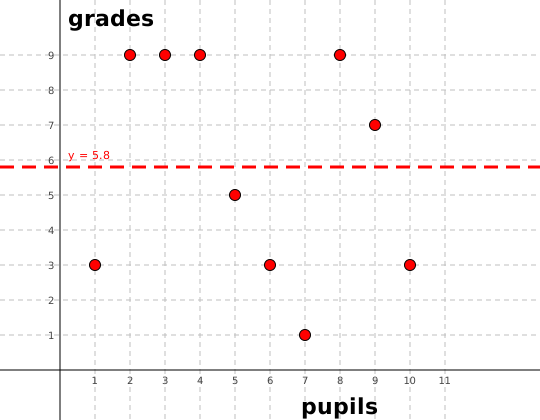
On the x-axis we have the pupils again (this time without names, so let's say 1 = Oliver, 2 = Harry and so on). On the y-axis we have the final grades. The line y = 5.8 shows the mean value.
We work out the variance as the mean of the squares of the distances from the mean. That sounds mysterious, but it is simple. We can think of x squared as the area of a square with side length x. So we draw squares on our graph whose side length is equal to the distance of each value from the mean:
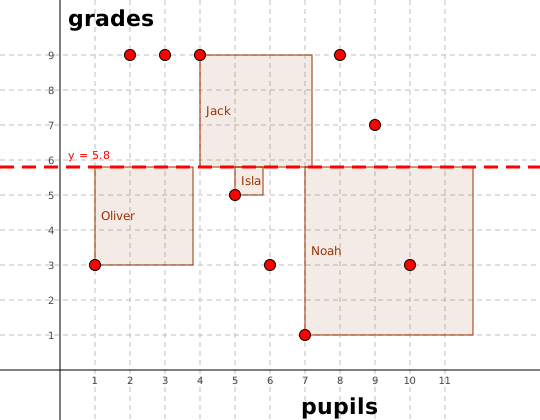
The graph shows four such squares, as there would not be room for all of them. We can see that Isla is quite close to the mean, so her square is small. Noah, on the other hand, is far from the mean, so his square is large. If we drew all the squares and worked out the mean area of those squares, we would get the variance.
Suppose we have a set of values X = [x1, …, xN], where
Or, using sigma notation, like this:
Why
The variance of our data set would then be:
The variance is 8.96. The variance of the maths results would look like this:
The variance is 1.16. We can see that the variance of this data set is, as expected, much smaller.
How to work out the variance in Excel
In Excel you can use the function VAR.P, or one of its variants. For VAR.P you give the selected range of cells as the argument.
